Passwords, IP Addresses, Reset to Default, Save and Restore Configuration
You can find the Arcadia IP address, manage the CCM password and reset to default settings.
 Find the Arcadia IP Address
- Press the Menu button on the front of the Arcadia.
- Navigate to Networking > Management > IP Address using the rotary controllers.
You will see the device IP address.

Find the default password for the CCM
- Press the Menu button on the front of the Arcadia.
- Navigate to Administration > CCM Access > Default Password using the rotary controllers.
- You will see the default password in the right hand menu screen.

Reset the device to default settings
- Press the Menu button on the front of the Arcadia.
- Navigate to Administration > Reset > Reset To Default > Reset Base.
- The Arcadia will reset to factory settings.

| Note: | When you use a pin reset on front the front of the Arcadia the device power cycles. |
| Note: | When resetting the Arcadia to default settings using the front panel menu system, all the system configuration details, including network settings are reset. The management IP of the Arcadia will change. |
| Note: | When you reset the Arcadia to default settings, you must Add the IP transceivers to the system again. See Adding IP Transceivers . |
| Note: | HelixNet endpoints will all revert to default configuration. |
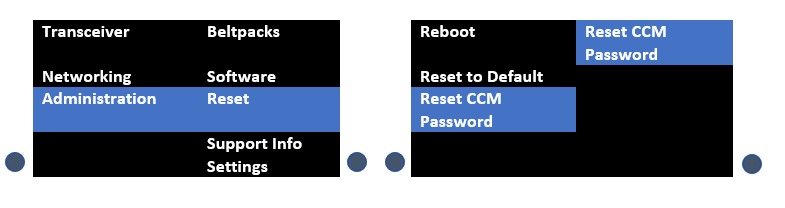
Reset the CCM password
- Press the Menu button on the front of the Arcadia.
- Using the right hand rotary controller select Administration > Reset > Reset CCM Pass.
- Press the right hand rotary controller.
- The password will reset to its default setting.
Save/Restore System Setup
Insert a USB drive into the USB connector on the front of the Arcadia.
Press the Menu button.
Using the rotary controllers, navigate to Administration > Settings > Save.
Push the 4th rotary controller. System setting are saved to the USB drive. The progress of this Save is shown in the notification bar on the front panel.
The file is saved in a folder called /backupConfig/ in the USB. The file name format is hostNameDateTime.cca.
| Note: | When you restore system settings in the CCM, Network and OTA System ID settings are optional. When you restore system settings from the front panel all settings are recalled which may cause system conflicts, unless you are intending to configure a cold standby Arcadia unit. |